

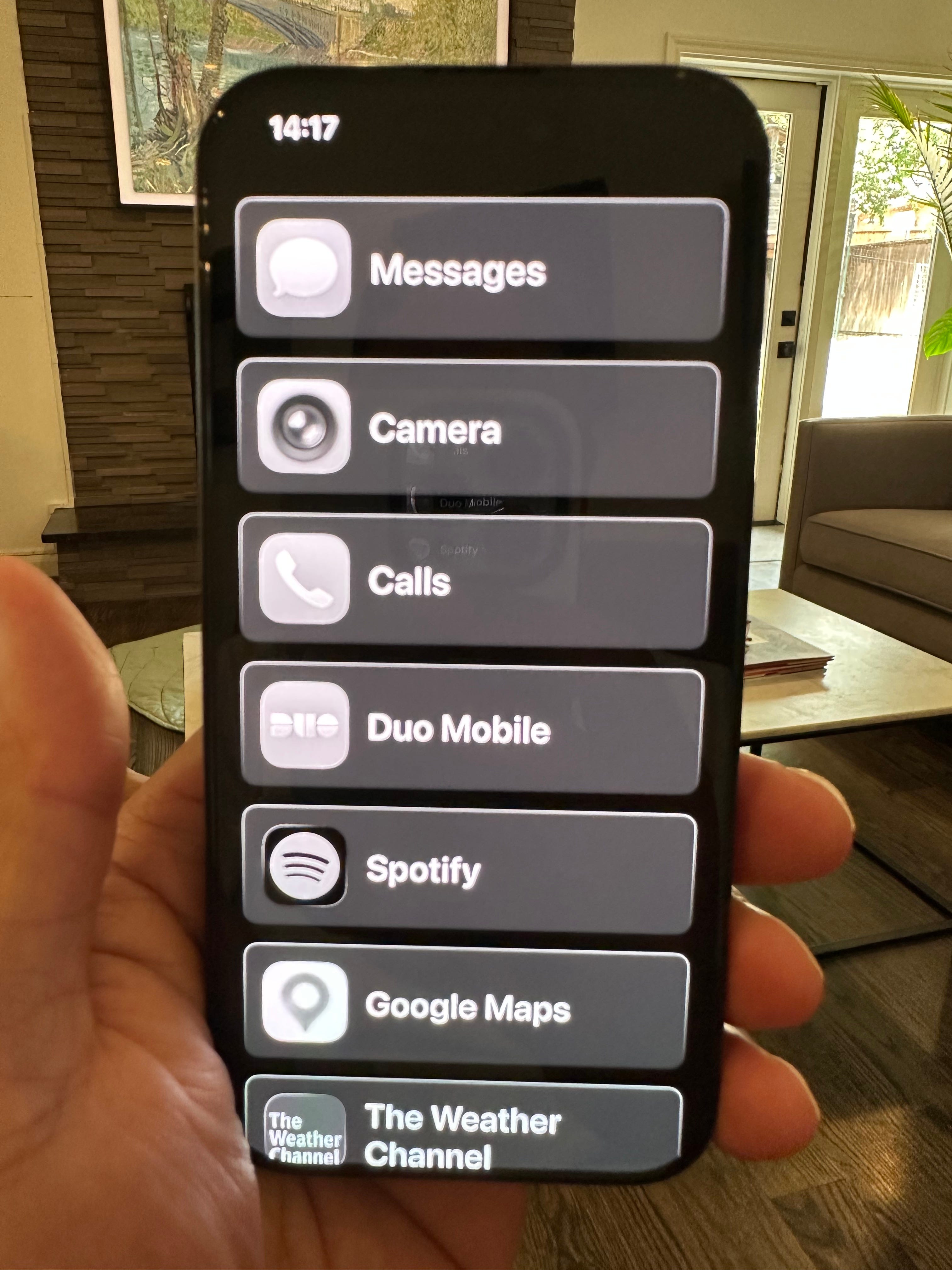
I just spent 30 days with a dumber iPhone.
The rationale? According to BankMyCell, the average smartphone user swipes or taps their device 2,167 times a day. I’m most definitely above that average, and I want to limit my own screen time. Make more attention margin. Be more present. And, I wanted to simulate life with a dumb flip phone without the hassle of actually buying one and moving my number over to it.
The verdict: it’s difficult for an executive. Really difficult. The personal side of things was overwhelmingly positive, but it had one significant drawback I didn’t see coming.
What I actually did
First, the technical setup. I turned on grayscale, then Apple’s Assistive Access, a mode Apple built for people with cognitive disabilities. It turns the home screen into a short list of apps in plain rows, and leaving it takes a triple-click and a passcode.
Then, through some trial and error, I picked what stayed. Messages, Phone, Signal and the camera. Maps, Strava and the car app. Spotify and Audible. Voice Memos, Obsidian and Claude. The apps that run our household (the Roborock, SmartThings, the Rachio sprinklers) and my bank. And because I have a job, work email, my calendar, Teams and Duo Mobile.
What got cut? Chrome, personal Gmail, the news and anything with a feed. Those are my main weaknesses, and they were the whole point.
What I got back
Time to think and read, especially audiobooks. And more presence with the people in front of me. According to Apple, my phone screen time fell 20%.
The biggest thing I got back? A deeper sense of curiosity. The best (and worst) part of this experiment was having to sit with small questions I couldn’t Google. My curiosity and wonder actually increased, simply because I had to sit with them. A question would come up and just stay there, unanswered, until I got back to a laptop or forgot about it.
What I discovered is that our world of instant answers is settling our curiosity before we can do any thinking. The net effect is a shallow satiation of curiosity. We scratch the itch in 10 seconds and move on, and the question never gets the chance to turn into anything bigger.
The friction
The other big friction point was the time it took to shift back into “normal” iOS. It was a full 20-second exit every time I wanted an app that wasn’t on the Assistive Access list. (The other escape hatch was my laptop.)
That delay was actually helpful when I felt like cheating on my experiment. Twenty seconds is just long enough to ask yourself whether you really need to check.
There were practical gaps, too. I couldn’t join a new Wi-Fi network from inside the mode, so every new office or friend’s house meant backing out of it. And the Assistive Access typing interface is so damn clunky that I wonder if it’s a feature and not a bug.
The one real drawback
Suprisingly, my replies to friends and family got slower. That was totally unexpected, and a little disappointing. It was mostly due to a lesser form of notification (and the lack of color, which was a weird thing to discover about myself) and a keyboard that ate my typing. The extended family and friends who I care about most were the ones who felt the experiment first. I don’t know if they necessarily care or can tell if my response time has gotten slower, but I certainly noticed. Don’t believe me? Stephanie Murray wrote about a similar result.
The grayscale surprise
Grayscale, which you commonly see at the top of every digital minimalism list, actually backfired. It’s even in my own notes as a tip. It made the whole phone worse, including the parts I need. And it turns out color is part of the equation on how I read my notifications at a glance. Ironically, the longer I stayed in grayscale, the more it pushed me back toward regular iOS.
The verdict
The friction works, especially if you aim it at your main weaknesses (which in my case were Chrome and the news). Inversely, if you spread it across everything, you’ll probably end up quitting the restrictions and going back to normal, wholesale.
One confession: Teams and Outlook stayed on, friction-free. I don’t tend to check them at night or on the weekends anyway, but when I need them, I really need them. So, they are persisting past the 30 day mark.
Final verdict: I don’t think I’ll be switching to a dumb phone anytime soon. But I am keeping Assistive Access, in color. It gives me all the access I need, but with some friction, allows me all the access I want.
P.S. Assistive Access might be a really good solution for those of you who have already given iPhones to your tweens, but struggle with their screen time. Or if you want a really gradual iPhone introduction for them.